DlhSoft offers several products and versions, targeting different platforms and having similar or slightly different goal sets and exposed features.
A comprehensive diagram that could help you selecting the appropriate product (for Windows and Web platforms) based on answers to specific questions that you may have is presented below:
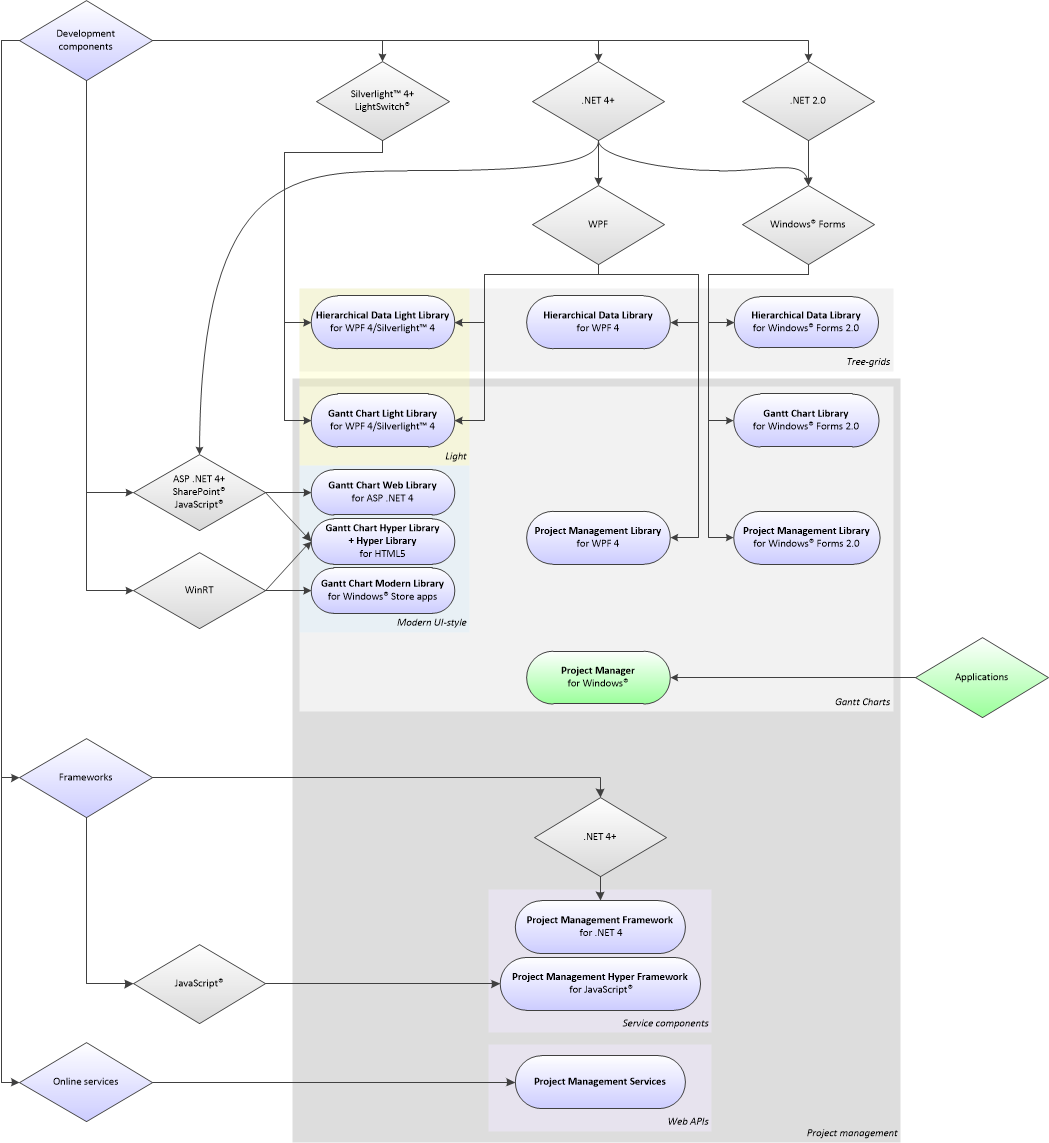
If you need specific user interface output, another diagram could help you selecting a product that includes the required components:

Finally, the most important features of available products are presented and compared in the exhaustive table below, with high granularity.
You can also review the available product usage license types and their prices:
|
Features / Products |
|||||||||||||||
|
Type |
Application |
Component library |
Component library |
Component library |
Component library |
Component library |
Component library |
Component library |
Component library |
Component library |
Component library |
Component library |
Component library |
Component library |
Online services |
|
Platform |
Windows®, .NET 4 |
.NET 4, WPF / Silverlight™ 4 |
.NET 4, ASP .NET + HTML5 |
ECMAScript 5, HTML5 |
WinRT (Windows® 8/8.1, RT 8/8.1, Windows® Phone 8.1) |
.NET 4, WPF |
.NET 4, WPF |
.NET 4, WPF / Silverlight™ 4 |
.NET 2.0 SP2, Windows® Forms |
.NET 2.0 SP2, Windows® Forms |
.NET 2.0 SP2, Windows® Forms |
ECMAScript 5, HTML5 |
.NET 4 |
ECMAScript 5 |
Web API (HTTP) |
|
Available since |
2008 |
2010 |
2012 |
2012 |
2012 |
2008 |
2008 |
2010 |
2005 |
2006 |
2006 |
2015 |
2013 |
2013 |
2015 |
|
Oriented to |
Simplicity |
Scalability and performance, optional data binding, Silverlight™ support |
Web server integration, ASP .NET platform |
HTML5 platform |
WinRT platform (Windows® 8/8.1, RT 8/8.1, and Windows® Phone 8.1) |
Data binding, business logic, and customizability |
Data binding, business logic, and customizability |
Scalability and performance, optional data binding, Silverlight™ support |
Business logic |
Data binding |
Data binding |
HTML5 platform |
Business logic |
Business logic |
Cloud apps |
|
Subset of |
– |
– |
– |
– |
– |
– |
– |
– |
– |
– |
– |
– |
– |
– |
– |
|
Internally uses |
– |
Hierarchical Data Light Library |
Gantt Chart Hyper Library |
– |
Gantt Chart Hyper Library |
Hierarchical Data Library |
– |
– |
– |
Hierarchical Data Library |
– |
– |
– |
– |
– |
|
Design goals |
Simple project management application with interactive Gantt Chart and related views |
Providing high performance interactive Gantt Chart and related controls optionally with associated task tree-list editor, with optional data binding support, working both on Silverlight™ and WPF |
Providing interactive Gantt Chart and related Web server controls working on ASP .NET platform and HTML5 client browsers |
Providing interactive Gantt Chart and related controls working on HTML5 and JavaScript® |
Providing interactive Gantt Chart and related controls working on WinRT (Windows® 8/8.1, RT 8/8.1, and Windows® Phone 8.1) |
Providing an interactive Gantt Chart control optionally with associated task tree-list editor, and other project management related controls such as for resource editing, Schedule Chart, and Load Chart, with data binding support and separated business logic components |
Combining ListView (with GridView) and TreeView, with data binding support and separated business logic components |
Combining DataGrid and TreeView into a high performance control, with optional data binding support, working both on Silverlight™ and WPF |
Providing an interactive Gantt Chart control with associated task tree-grid editor, with separated business logic providing components |
Providing an interactive Gantt Chart control with associated task tree-grid editor, with data binding support |
Combining DataGridView and TreeView in a single control, with data binding support |
Providing interactive calendar, date picker, multi-selector combo box, tree-grid and other controls working on HTML5 and JavaScript® |
Providing core project management and task scheduling business logic for all types of .NET applications, without offering built-in user interface controls |
Providing core project management and task scheduling business logic for all types of JavaScript® applications, without offering built-in user interface controls |
Providing core project management and task scheduling business logic as online APIs available for cloud applications, without offering built-in user interface controls |
|
Business logic classes |
– |
None (not separated) |
None (not separated) |
None (not separated) |
None (not separated) |
TaskManager (Task, TaskItem), ResourceManager (Resource, ResourceItem), ScheduleDefinitionManager (ScheduleDefinition, ScheduleDefinitionItem), Schedule, etc. |
NodeManager (Node, NodeItem) |
None (not separated) |
Project Management Framework (Task, Resource, Schedule, etc.) |
None (not separated) |
None (not separated) |
None (not separated) |
TaskManager (TaskItem), Schedule |
TaskManager |
– |
|
Standard Edition controls |
Project details view (including schedule definition view), task list view (including task hierarchy and Gantt Chart), resource list view (including Schedule Chart, and Load Chart), PERT chart and network diagram views |
GanttChartDataGrid, ScheduleChartDataGrid, LoadChartDataGrid, GanttChartView, ScheduleChartView, LoadChartView, PertChartView, NetworkDiagramView |
GanttChartView, ScheduleChartView, LoadChartView, PertChartView, NetworkDiagramView |
GanttChartView, ScheduleChartView, LoadChartView, PertChartView, NetworkDiagramView |
GanttChartView, ScheduleChartView |
GanttChartTaskListView, ScheduleChartResourceListView, LoadChartResourceListView, GanttChartView, ScheduleChartView, LoadChartView, TaskListView, ResourceListView, ScheduleDefinitionView, PertChartView, NetworkDiagramView |
TreeListView |
DataTreeGrid |
ProjectView, ResourcesView, ScheduleView, StatisticsView |
GanttChartView, ResourceLoadChartView |
DataTreeGridView |
Calendar, DatePicker, TimePicker, DateTimePicker, MultiSelectorComboBox, ComboBox, DropDownList, TextBox, Button, ToggleButton, ToolTip, Grid, TreeGrid, ContentControl, ItemsControl |
– |
– |
– |
|
Basic Edition controls |
– |
GanttChartDataGrid, ScheduleChartDataGrid, GanttChartView, ScheduleChartView |
GanttChartView, ScheduleChartView |
GanttChartView, ScheduleChartView |
– |
– |
– |
– |
– |
– |
– |
– |
– |
– |
– |
|
Mini Edition controls |
– |
GanttChartDataGrid, GanttChartView |
GanttChartView |
GanttChartView |
– |
– |
– |
– |
– |
– |
– |
– |
– |
– |
– |
|
Supported on .NET 4.5 |
Yes |
Yes, natively, using Rebuild 5-4.5 |
Yes, using ASP .NET on server side |
Yes, using ASP .NET and HTML5 |
No, but allows using .NET languages supported by WinRT |
Yes |
Yes |
Yes, natively, using Rebuild 5-4.5 |
Yes |
Yes |
Yes |
Yes, using ASP .NET and HTML5 |
Yes |
Yes, using ASP .NET and HTML5 |
Yes, as HTTP client |
|
Supported on Silverlight™ 5 / LightSwitch® |
– |
Yes, natively, using Rebuild 5-4.5 / using Extension 5-LightSwitch |
Interoperable (using JavaScript®) / No |
Interoperable (using JavaScript®) / using custom code |
No |
No |
No |
Yes, natively, using Rebuild 5-4.5 / as Custom Control |
No |
No |
No |
Interoperable (using JavaScript®) / using custom code |
Yes / as custom code |
Interoperable / as custom code |
Yes, as HTTP client |
|
Supported on .NET 4 |
Yes, natively |
Yes, natively |
Yes, natively, using ASP .NET on server side |
Yes, using ASP .NET and HTML5 |
No, but allows using .NET languages supported by WinRT |
Yes, natively |
Yes, natively |
Yes, natively |
Yes |
Yes |
Yes |
Yes, using ASP .NET and HTML5 |
Yes, natively |
Yes, using ASP .NET and HTML5 |
Yes, as HTTP client |
|
Supported on Silverlight™ 4 |
– |
Yes, natively |
Interoperable (using JavaScript®) |
Interoperable (using JavaScript®) |
No |
No |
No |
Yes, natively |
No |
No |
No |
Interoperable (using JavaScript®) |
Yes |
Interoperable |
Yes, as HTTP client |
|
Supported on Windows® Store apps (WinRT) |
– |
No |
No |
Interoperable (using JavaScript®) |
Yes, natively |
No |
No |
No |
No |
No |
No |
Interoperable (using JavaScript®) |
Yes |
Interoperable |
Yes, as HTTP client |
|
Supported on Windows® Phone Store apps (WinRT) |
– |
No |
No |
Interoperable (using JavaScript®) |
Yes, natively |
No |
No |
No |
No |
No |
No |
Interoperable (using JavaScript®) |
Yes |
Interoperable |
Yes, as HTTP client |
|
Supported on Universal Store apps (WinRT) |
– |
No |
No |
Interoperable (using JavaScript®) |
Yes, natively |
No |
No |
No |
No |
No |
No |
Interoperable (using JavaScript®) |
Yes |
Interoperable |
Yes, as HTTP client |
|
Supported on HTML5 (JavaScript®) |
– |
No |
Yes, natively, on client side |
Yes, natively |
No (it uses HTML5 internally) |
No |
No |
No |
No |
No |
No |
Yes, natively |
No |
Yes, natively |
Yes |
|
Supported on .NET 3.5 |
No |
No |
Yes, using Rebuild 2 |
Yes, using ASP .NET and HTML5 |
No |
No |
No |
No |
Yes |
Yes |
Yes |
Yes, using ASP .NET and HTML5 |
No |
Yes, using ASP .NET and HTML5 |
Yes, as HTTP client |
|
Supported on .NET 2.0 / SharePoint® |
No |
No |
Yes, natively, using Rebuild 2 / using Extension 2-SharePoint |
Yes, using ASP .NET and HTML5 |
No |
No |
No |
No |
Yes, natively / No |
Yes, natively / No |
Yes, natively / No |
Yes, using ASP .NET and HTML5 |
No |
Yes, using ASP .NET and HTML5 |
Yes, as HTTP client |
|
Supported in WPF (Windows® Presentation Foundation) applications |
– |
Yes, natively |
No |
No |
No |
Yes, natively |
Yes, natively |
Yes, natively |
Yes, using Windows® Forms Integration |
Yes, using Windows® Forms Integration |
Yes, using Windows® Forms Integration |
No |
Yes |
No |
Yes, as HTTP client |
|
Supported in Silverlight™/LightSwitch® applications |
– |
Yes, natively / using Extension 5-LightSwitch |
No |
Interoperable (using JavaScript®) / as custom code |
No |
No |
No |
Yes, natively / as Custom Control |
No |
No |
No |
Interoperable (using JavaScript®) / as custom code |
Yes / as custom code |
Interoperable / as custom code |
Yes, as HTTP client |
|
Supported in ASP .NET based Web applications / SharePoint® applications |
– |
No |
Yes, natively / using Extension 2-SharePoint |
Yes |
No |
No |
No |
No |
No |
No |
No |
Yes |
Yes |
Yes |
Yes |
|
Supported in ASP .NET based Web sites |
– |
No |
Yes, natively |
Yes |
No |
No |
No |
No |
No |
No |
No |
Yes |
Yes |
Yes |
Yes |
|
Supported in ASP .NET MVC (and .NET Core MVC) based Web applications |
– |
No |
Yes |
Yes |
No |
No |
No |
No |
No |
No |
No |
Yes / no for .NET Core |
Yes / no for .NET Core |
Yes / no for .NET Core |
Yes |
|
Supported in Angular/React/Vue based applications |
– |
No |
No |
AngularJS/Angular/React/Vue extensions |
No |
No |
No |
No |
No |
No |
No |
AngularJS extension only |
No |
Yes |
Yes |
|
Supported in Windows® Forms applications |
– |
Yes, using Windows® Forms Integration |
No |
No |
No |
Yes, using Windows® Forms Integration |
Yes, using Windows® Forms Integration |
Yes, using Windows® Forms Integration |
Yes, natively |
Yes, natively |
Yes, natively |
No |
Yes |
No |
Yes, as HTTP client |
|
Integrates with Visual Studio® 2012/2013/2015 |
– |
Yes |
Yes |
Yes, for HTML and JavaScript® code editing |
Yes, natively |
Yes |
Yes |
Yes |
Yes |
Yes |
Yes |
Yes, for HTML and JavaScript® code editing |
Yes |
Yes, for code editing |
– |
|
Integrates with Visual Studio® 2012/2013/2015 Express for Windows® 8/8.1/10 |
– |
No |
No |
Yes, for HTML and JavaScript® code editing |
Yes, natively |
No |
No |
No |
No |
No |
No |
Yes, for HTML and JavaScript® code editing |
Yes |
Yes, for code editing |
– |
|
Integrates with Visual Studio® 2010 |
– |
Yes, natively |
Yes, natively |
Yes, for HTML and JavaScript® code editing |
No |
Yes, natively |
Yes, natively |
Yes, natively |
Yes |
Yes |
Yes |
Yes, for HTML and JavaScript® code editing |
Yes, natively |
Yes, for code editing |
– |
|
Integrates with Visual Studio® 2008 |
– |
No |
No |
Yes, for HTML and JavaScript® code editing |
No |
No |
No |
No |
Yes |
Yes |
Yes |
Yes, for HTML and JavaScript® code editing |
No |
Yes, for code editing |
– |
|
Integrates with Visual Studio® 2005 |
– |
No |
No |
Yes, for HTML and JavaScript® code editing |
No |
No |
No |
No |
Yes, natively |
Yes, natively |
Yes, natively |
Yes, for HTML and JavaScript® code editing |
No |
Yes, for code editing |
– |
|
Data binding support |
– |
Yes, using either a built-in or a custom items converter |
No |
– |
No |
Yes |
Yes |
Yes, using either a built-in or a custom items converter |
No |
Yes |
Yes |
– |
No |
No |
– |
|
Customizable grid columns |
Yes, partial (resizing and reordering) |
Yes |
Yes, partial (design time resizing and reordering, or removing pre-existing columns, and adding new read only columns to present custom item properties) |
Yes |
Yes, partial (design time resizing and reordering, or removing pre-existing columns, and adding new read only columns to present custom item properties) |
Yes |
Yes |
Yes |
Yes, partial (not at design time: for adding new columns you are required to define a CustomTask base class, inheriting from Task, and write code to add corresponding columns to the grid) |
Yes |
Yes |
Yes |
– |
– |
– |
|
Customizable schedule |
Yes, day of week and date-based mappings to day work time intervals |
Yes, both for all tasks at once (general schedule) and customizable per task, supporting custom working week and day duration definitions, and specific nonworking time intervals (e.g. holidays) |
Yes, for all tasks at once (general schedule) and customizable per task, supporting custom working week and day duration definitions, and special nonworking days (holidays) |
Yes, for all tasks at once (general schedule) and customizable per task, supporting custom working week and day duration definitions, and special nonworking days (holidays) |
Yes, for all tasks at once (general schedule), supporting custom working week and day duration definitions, and special nonworking days (holidays) |
Yes, general schedule and customizable per task and/or per resource, fully configurable such as per day of week, for specific dates (including holidays), or for any arbitrary other condition determined by date (using a delegate) |
– |
– |
Yes, general schedule and customizable per task and/or per resource, supporting different work hours per day of week, or for specific dates (including holidays) |
Yes, but only all tasks and resources at once (general schedule), supporting different work hours per day of week, or for specific dates (including holidays) |
– |
– |
Yes, both for all tasks at once (general schedule) and customizable per task, supporting custom working week and day duration definitions, and specific nonworking time intervals (e.g. holidays) |
Yes, for all tasks at once (general schedule) and customizable per task, supporting custom working week and day duration definitions, and nonworking days (holidays) |
Yes |
|
Task timing driver properties |
Start, effort, assignment allocation units (sum), general/task/resource schedules |
Start, finish |
Start, finish |
Start, finish |
Start, finish |
Start, effort, assignment allocation units (sum), general/task/resource schedules |
– |
– |
Start, effort, assignment allocation units (sum), general/task/resource schedule |
Start, effort, resource allocation units (sum), general schedule (considering object data binding mode) |
– |
– |
Start, finish |
Start, finish |
Start, finish |
|
Task start and finish date and times granularity |
Any date and time |
Any date and time (DateTime object) |
Any date and time (DateTime object) |
Any date and time (Date object) |
Any date and time (DateTimeOffset object) |
Any date and time (DateTime object) |
– |
– |
Any date (DateTime object), without time of day information (however, the user interface is able to internally determine time of day information for tasks based on assigned resources on each date) |
Any date and time (DateTime object) |
– |
– |
Any date and time (DateTime object) |
Any date and time (Date object) |
Any date and time (DateTime object) |
|
Minimum logical time unit |
Minute |
Tick |
Tick |
Fractions of second |
Tick |
Tick |
– |
– |
Day |
Tick |
– |
– |
Tick |
Fractions of second |
Tick |
|
Task effort and duration granularity |
Any time span value |
Any time span (TimeSpan object), automatically computed based on start and finish |
Any time span (TimeSpan object), internally computed based on start and finish |
Any time span (numeric value), in milliseconds, internally computed based on start and finish |
Any time span (TimeSpan object), internally computed based on start and finish |
Any time span value (TimeSpan object) |
– |
– |
Any time span (hours float number) |
Any time span (hours float number) |
– |
– |
Any time span (TimeSpan object), internally computed based on start and finish |
Any time span (numeric value), in milliseconds, internally computed based on start and finish |
Any time span (TimeSpan object), internally computed based on start and finish |
|
Customizable Gantt Chart time scale |
Yes, including weeks/days, days/hours, and months/weeks |
Yes, any number of scale rows, including built-in and custom defined scale definitions (using interval collections), supporting custom visible week and day duration definitions |
Yes, any number of scale rows, including built-in and custom defined scale definitions (using interval collections), supporting custom visible week and day duration definitions |
Yes, any number of scale rows, including built-in and custom defined scale definitions (using interval collections), supporting custom visible week and day duration definitions |
Yes, any number of scale rows, including built-in and custom defined scale definitions (using interval collections), supporting custom visible week and day duration definitions |
Yes, any number of scale rows, including built-in and custom defined scale definitions (using delegates) |
– |
– |
Yes, two scale rows: days/hours, weeks/days, months/weeks, quarters/months, and years/quarters |
Yes, two scale rows: days/hours, weeks/days, months/weeks, quarters/months, and years/quarters |
– |
– |
– |
– |
– |
|
Customizable Gantt Chart update scale (drag and drop automatic rounding for date time values) |
Yes, including days, hours, hour quarter, and free |
Yes, including built-in and custom defined update scale definition (using a time span value for rounding up, starting at the current timeline page start) |
Yes, using a time span value for rounding up |
Yes, using a numeric value in milliseconds for rounding up |
Yes, using a time span value for rounding up |
Yes, including built-in and custom defined update scale definition (using a delegate) |
– |
– |
Yes, hours, days, visible scale-based, or free |
Yes, hours, days, visible scale-based, or free |
– |
– |
– |
– |
– |
|
Integrated displaying and hiding nonworking days and hours |
Yes |
Partially, supporting custom visible week and day duration definitions, and highlighting visible nonworking time intervals using a different customizable background brush |
Partially, supporting custom visible week definitions, and highlighting weekend intervals |
Partially, supporting custom visible week definitions, and highlighting weekend intervals |
Partially, supporting custom visible week definitions, and highlighting weekend intervals |
Yes |
– |
– |
No |
Yes, using specific properties |
– |
– |
– |
– |
– |
|
Configurable task bar templates (standard, parent, and milestones) |
No |
Yes, using general data member properties, and fully customizable task bar templates |
Yes, partial, using general and item level data member properties, CSS classes, and/or by using client side code to set task bar templates |
Yes, using general properties, and fully customizable task bar templates defined as JavaScript® functions |
Yes, partial, using general and item level data member properties |
Yes, using general and task specific data member properties, and fully customizable task bar templates |
– |
– |
Yes, using general properties, and per task setter methods |
Yes, using general and task specific data member properties |
– |
– |
– |
– |
– |
|
Integrated displaying and hiding baseline (estimated) time values using a secondary task bar in the Gantt Chart |
Yes |
Yes |
Yes |
Yes |
Yes |
Yes, and a sample application shows how to extend the control to include such elements using a custom task bar template |
– |
– |
No |
Yes, using task specific data member properties |
– |
– |
– |
– |
– |
|
Customizable task bar tool tips |
No |
Yes, based on general tool tip template |
Yes, partial, by using client side code to set item template |
Yes, based on item template |
No |
Yes, based on item template |
– |
– |
No |
Yes, using task specific data member properties |
– |
– |
– |
– |
– |
|
Integrated material resource quantity support |
No |
Yes |
Yes |
Yes |
No |
No |
– |
– |
No |
No |
– |
– |
Yes |
Yes |
No |
|
Integrated automatic task cost computation |
Yes |
Yes |
Yes |
Yes |
No |
Yes |
– |
– |
Yes |
No |
– |
– |
Yes |
Yes |
No |
|
Integrated resource leveling |
Yes |
Yes, when assignments are specifically formatted |
Yes, when assignments are specifically formatted |
Yes, when assignments are specifically formatted |
No |
Yes, without considering resource allocation units |
– |
– |
Yes |
No |
– |
– |
Yes |
Yes |
Yes |
|
Integrated critical task determination and/or highlighting |
No |
Yes, except that highlighting requires custom code |
Yes, except that highlighting requires custom code |
Yes, except that highlighting requires custom code |
No |
No, but a sample application shows how to determine and highlight critical tasks (using custom code) |
– |
– |
Yes |
Yes |
– |
– |
Yes (determination) |
Yes (determination) |
Yes (determination) |
|
Resource management user interface control |
Yes |
Not necessary, resources may be managed using a simple data list |
Not necessary, resources may be managed using a simple data list |
Not necessary, resources may be managed using a simple data list |
Not necessary, resources may be managed using a simple data list |
Yes |
– |
– |
Yes |
No |
– |
– |
– |
– |
– |
|
Resource Schedule Chart view user interface control (resource-oriented Gantt Chart control with multiple task bars per resource row) |
Yes |
Yes†, including support for displaying conflicting assignment bars vertically spread on multiple lines associated to a single data grid row, automatically increasing its height, and connector methods (GetScheduleChartItems and UpdateChangesFromScheduleChartItems) |
Yes†, including connector method (GetScheduleChartItems) |
Yes†, including connector method (getScheduleChartItems) |
Yes |
Yes, including connector methods (GetScheduleChartItems and UpdateChangesFromScheduleChartItems) |
– |
– |
No |
No |
– |
– |
– |
– |
– |
|
Resource Load Chart view user interface control and/or resource allocation information availability |
Yes |
Yes†, including connector method (GetLoadChartItems) |
Yes†, including connector method (GetLoadChartItems) |
Yes†, including connector method (getLoadChartItems) |
No |
Yes, including connector method (GetLoadChartItems) |
– |
– |
No |
Yes |
– |
– |
Yes (allocation information) |
Yes (allocation information) |
– |
|
PERT Chart output support |
Yes |
Yes†, including connector method (GetPertChartItems) |
Yes†, including connector method (GetPertChartItems) |
Yes†, including connector method (getPertChartItems) |
No |
Yes, including connector method (GetPertChartItems) |
– |
– |
No |
No |
– |
– |
– |
– |
– |
|
Network Diagram output support |
Yes |
Yes†, including connector method (GetNetworkDiagramItems) |
Yes†, including connector method (GetNetworkDiagramItems) |
Yes†, including connector method (getNetworkDiagramItems) |
No |
Yes, including connector method (GetNetworkDiagramItems) |
– |
– |
No |
No |
– |
– |
– |
– |
– |
|
Schedule Definition user interface control (for selecting working and nonworking time intervals) |
Yes |
No |
No |
No |
No |
Yes |
– |
– |
Yes |
No |
– |
– |
– |
– |
– |
|
Statistics chart view user interface control |
No, but overall statistic data fields are available |
No, but methods retrieving overall statistic data are available |
No, but methods retrieving some overall statistic data are available |
No, but methods retrieving some overall statistic data are available |
No |
No, but properties retrieving overall statistic data are available |
– |
– |
Yes |
No |
– |
– |
No, but methods retrieving some overall statistic data are available |
No, but methods retrieving some overall statistic data are available |
– |
|
Integrated support for loading and saving data from/to XML files |
Yes |
Yes, using Microsoft® Project® schema |
Yes, using Microsoft® Project® schema |
Yes, from/to XML content strings, using Microsoft® Project® schema |
No |
No, but a sample application shows how to load and save data from and to XML files |
– |
– |
Yes |
No |
– |
No |
Yes, using Microsoft® Project® schema |
No |
– |
|
Integrated support for loading and saving data from/to a database |
No |
No |
No, but a sample application shows how to load and save data from/to a database (using LINQ to SQL) |
– |
No |
No, but a sample application shows how to load and save data from/to a database (using LINQ to SQL) |
– |
– |
No |
No, but a sample application shows how to load and save data from/to a database (using DataSet and table adapters) |
– |
No |
No |
No |
– |
|
Integrated support for importing task data from Microsoft® Project® files saved as XML |
No |
Yes |
Yes |
Yes, from XML content strings |
No |
No, but a sample application shows how to import task data from Microsoft® Project® files saved as XML |
– |
– |
No |
No |
– |
– |
Yes |
No |
Yes |
|
Integrated support for exporting task data to Microsoft® Project® XML files |
Yes |
Yes |
Yes |
Yes, to XML content strings |
No |
Yes |
– |
– |
No, but a sample application shows how to import task data from Microsoft® Project® files saved as XML, which you can use to develop a similar export feature |
No |
– |
– |
Yes |
No |
Yes |
|
Printing support |
Yes |
Yes, optionally providing further customizations using page templating, built-in document paginators, or by reusing exported images obtained for the specifically available printing size |
Only as provided by the client browser |
Only when, and only as provided by the host platform or browser |
No |
Yes, using default page templating, optionally providing further customizations using built-in document paginators, or by reusing exported images obtained for the specifically available printing size |
No |
No |
Yes, using default page templating, optionally providing further customizations by reusing exported images obtained for the specifically available printing size |
Yes, using default page templating, with built-in support for printing both the grid and the Gantt Chart area on the same page |
No |
Only when, and only as provided by the host platform or browser |
No |
No |
– |
|
Support for exporting images |
No |
Yes |
No |
No |
No |
Yes |
No |
No |
Yes |
No |
No |
No |
No |
No |
Yes |
|
Support for defining time constraints for items |
Yes |
Yes |
Yes |
Yes |
Yes |
Yes |
– |
– |
No |
No |
– |
– |
Yes |
Yes |
Yes |
|
Support for hierarchically sorting the item collection |
No |
Yes, and a sample application shows how to perform hierarchical sorting |
Yes |
No |
No |
No, but a sample application shows how to perform hierarchical sorting externally |
No, but a sample application shows how to perform hierarchical sorting externally |
Yes, and a sample application shows how to perform hierarchical sorting |
No |
Yes, but in certain conditions only |
Yes |
No |
No |
No |
– |
|
Support for moving items in the collection, changing order and/or hierarchy relationships |
Yes |
Yes, including by drag and drop operations using thumbs provided by a built-in column available to be added to the grid, and you can also remove and re-insert items into the data source collection externally |
Yes, and you can also remove and re-insert items into the data source collection externally |
Yes, including by drag and drop operations using thumbs provided by a built-in column available to be added to the grid, and you can also remove and re-insert items into the data source collection externally and trigger output refreshing |
No, but you can remove and re-insert items into the data source collection externally |
No, but you can remove and re-insert items into the data source collection externally |
No, but you can remove and re-insert items into the data source collection externally |
Yes, and you can also remove and re-insert items into the data source collection externally |
No, but you can remove and re-insert items into the data source collection externally |
No, but you can remove and re-insert items into the data source collection externally |
No, but you can remove and re-insert items into the data source collection externally |
Yes, including by drag and drop operations using thumbs provided by a built-in column available to be added to the grid, and you can also remove and re-insert items into the data source collection externally and trigger output refreshing |
No, but you can remove and re-insert items into the data source collection externally |
No, but you can remove and re-insert items into the data source collection externally and trigger output refreshing |
– |
|
Copy/paste support |
Yes |
Yes |
No |
No |
No |
No |
No |
No |
Yes |
No |
No |
No |
No |
No |
– |
|
Undo/redo queue |
Yes |
Yes |
No |
No |
No |
No |
No |
No |
No |
No |
No |
No |
No |
No |
– |
|
General use controls included |
– |
No |
No |
Calendar, date picker, multi-selector combo box |
No |
No |
No |
No |
No |
No |
No |
Calendar, date picker, multi-selector combo box, tree-grid, several others |
No |
No |
– |
|
Globalization support |
English (United States) |
All cultures supported by the platform |
Partial (considering the starting day of week, and element order and separator character for date formatting and parsing), for all cultures supported by the platform |
English (United States) defaults, but with support for customizing the starting day of week, and date and time formatting and parsing for all cultures supported by the platform |
Partial (considering the starting day of week, and element order and separator character for date formatting and parsing), for all cultures supported by the platform |
All cultures supported by the platform |
All cultures supported by the platform |
All cultures supported by the platform |
All cultures supported by the platform |
All cultures supported by the platform |
All cultures supported by the platform |
Not required |
Not required |
Not required |
English (United States) |
|
Localization support |
English (United States) |
All languages, as the controls define properties to allow setting any displayed string values |
All languages, as the controls define properties to allow setting any displayed string values |
All languages, as the controls define properties and accept template functions to allow setting any displayed string values |
All languages, as the controls define properties to allow setting any displayed string values |
All languages, as the controls do not define specific strings or other objects that need translating |
All languages, as the controls do not define specific strings or other objects that need translating |
All languages, as the controls do not define specific strings or other objects that need translating |
English, and Romanian, based on satellite assemblies; for any other language contact DlhSoft for obtaining an XML with resource strings to translate yourself; later the translated XML contents can be used by DlhSoft to generate the requested localized satellite assembly for your language |
All languages, as the controls do not provides strings or other objects that need translating or exposes those strings or objects as properties for allowing the developer to set them as needed |
All languages, as the controls do not provides strings or other objects that need translating |
Not required |
Not required |
Not required |
English |
|
Performance indicators and recommendations |
Less than 2,000 tasks recommended |
Highest performance among similar component libraries; less than 20,000 tasks recommended; asynchronous loading and virtualization features are enabled by default |
Less than 2,000 tasks recommended, due to server-client data transfer delays; virtualization feature is enabled by default on client side |
Less than 20,000 tasks recommended; virtualization feature is enabled by default |
Less than 5,000 tasks recommended, due to internal data transfer delays between WinRT and HTML5; virtualization feature is enabled by default |
Less than 2,000 tasks recommended; asynchronous loading feature is enabled by default, and an increase performance sample application is available presenting further optimization techniques |
Less than 25,000 nodes recommended; asynchronous loading and virtualization features are enabled by default, and an increase performance sample application is available presenting further optimization techniques |
Highest performance among similar component libraries; less than 250,000 nodes recommended; asynchronous loading and virtualization features are enabled by default |
Less than 5,000 tasks recommended; asynchronous mode applied by default (cannot be disabled) |
Less than 10,000 tasks recommended; asynchronous mode applied by default (can be disabled) |
Less than 50,000 nodes recommended |
Less than 20,000 nodes recommended; virtualization feature is enabled by default |
Less than 20,000 tasks recommended |
Less than 20,000 tasks recommended |
Less than 1,000 tasks required |
† Advanced components and library source code are not available with Basic Edition and/or Mini Edition licenses.